
 1 / 7
1 / 7Viewsonic · Interaktivne table i smartbordovi
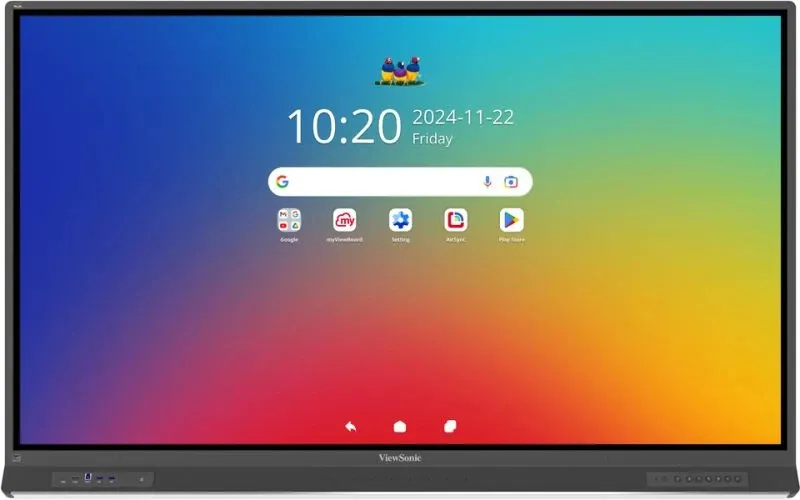
Viewsonic IFP7553-ED interactive whiteboard
Viewsonic IFP7553-ED, 189.2 cm (74.5"), 1650.24 x 928.26 mm, 450 cd/m², 1.07 billion colours, 3840 x 2160 pixels, 4K Ultra HD
Near Field Communication (NFC): YesBuilt-in microphone: YesBuilt-in projector: NoAnti-glare screen: YesDisplayPort version: 1.2Operating temperature (T-T): 0 - 40 °C
Specifikacije
- Near Field Communication (NFC)
- Yes
- Built-in microphone
- Yes
- Built-in projector
- No
- Anti-glare screen
- Yes
- DisplayPort version
- 1.2
Opis
Discover the future of interactive learning with the dynamic ViewBoard® IFP53 Series. Enhancing convenience, its SSO and NFC card sign-in functions provide quick access to personalized launchers and cloud storage. The shortcut sidebar enables quick-start multitasking, making it easier than ever to start your lessons. With quick-start annotation and the ability to rapidly switch between four colors, you can capture thoughts the moment inspiration strikes. Equipped with Android 14, it features a powerful high-performance octa-core processor complemented by up to 16GB RAM, ensuring seamless connectivity and uninterrupted productivity. The integrated ViewSonic Education Software completes the experience, fostering collaboration and engagement in classrooms with interactive digital tools designed to maximize students' potential.
One-tap Access
Striking the perfect balance between ease of use and security, the IFP53 offers hassle-free sign-in with a simple tap of an NFC card to swiftly access the intuitive interface. For guests, the convenient Guest Login feature enables rapid and effortless access without compromising sensitive data and settings.
Always in Sync
Access your ViewBoard through your myViewBoard account or the convenient SSO options for instant access to your cloud-stored files, personalized app settings, and saved bookmarks. With this streamlined cloud integration, your lessons can flow smoothly, free from the hassle of juggling multiple login credentials.
Write Away Effortlessly
Write smoothly, sketch with precision, and annotate with ease directly on the ViewBoard from the moment you pick up the stylus. The IFP53 Series offers a quick-start writing experience that feels as natural and immediate as putting pen to paper. Simply grab your stylus and let your thoughts flow.
Capture Every Colorful Thought
Swap colors with a simple click of the optional VB-PEN-010 stylus to transform simple annotations into vibrant expressions. Whether you're highlighting key concepts, adding colorful notes, or sketching out ideas, the VB-PEN-010 stylus ensures you get your message across.
Power Through Your Day
Boasting a high-performance octa-core CPU and 16GB RAM, the IFP53 Series excels in multitasking. Beyond delivering seamless operation across demanding applications, the IFP53 Series comes equipped with the Android 14, keeping you ahead of the curve with the latest advancements in efficiency, features, and security.
Keep Data Safe with Advanced Security EDLA-Certified with Android 14
Rest easy knowing your classroom data is protected by the latest security features unlocked by the EDLA certification. From automatic updates and Google Play Protect to data encryption and two-way authentication, every layer works together to ensure data stays in the right hands.
Multitask with Ease
Take control of your workflow with the IFP53 Series’ versatile multitasking capabilities. Jot down notes in one window with test questions snapped side-by-side for focused learning, or break free from the grid with resizable floating windows – perfect for dynamic presentations that truly captivate.
One Cable, Endless Possibilities
Experience streamlined efficiency with the ViewBoard® IFP53 Series, designed with 4 USB-C ports for comprehensive connectivity. Facilitating instant multimedia playback, seamless data transfer, and convenient device charging all from a single cable, it simplifies your setup to ensure a sleek, clutter-free environment.
Convenient Wireless Screen Sharing
Enjoy the convenience of seamless wireless screen sharing with AirSync, perfect for straightforward presentations and accommodating guest users through browser-based casting. Alternatively, expand your teaching possibilities with AirSync advanced split, extended, and grouped screen casting functions.
Supercharge Learning with myViewBoard
Ignite student participation with this integrated, cross-platform digital whiteboard app. Whether you're teaching online or in-person, its infinite canvas and advanced, user-friendly whiteboarding tools—such as pop quizzes, embedded multimedia, and timers—ensure that your students stay engaged and motivated.
Simplified Interactive Learning
Energize your lessons with ClassSwift. Quickly create interactive push-and-respond quizzes from your existing materials, simplifying lesson planning and boosting student engagement. Plus, its comprehensive real-time reports empower you to tailor lessons to the unique needs and comprehension levels of every student.
Boost Learning with Google Integration
Get native access to Docs, Slides, and other Google apps you know and trust—all within a familiar interface. And with thousands of educational tools available through the Google Play Store, you can spark curiosity and keep students engaged with everything from interactive science experiments to language-learning games and music apps.
Hear Every Nuance
Boasting an integrated 8-microphone array and precision speakers, the IFP53 Series is designed to capture and deliver every word with remarkable clarity. With advanced noise-canceling technology, it ensures that your voice resonates just as clearly during remote collaboration as it does when you're in the same room.
See Clearly, Learn Comfortably
Putting the health and comfort of students and teachers first, the IFP53 Series combines flicker-free technology, a blue light filter, and an anti-glare coating to guarantee clear visibility in all lighting environments. This results in a screen that is gentler on the eyes and minimizes discomfort, even with prolonged use.
Simplified Device Management
Streamline campus device management with ViewSonic Manager. This centralized solution empowers the remote control, maintenance, and media broadcasting to network displays — all through a secure and user-friendly web platform. Plus, with remote on/off and ECO mode control, it supports energy conservation efforts to help schools achieve their sustainability goals.
*Multimedia broadcasts and ECO mode control are available with the optional Advanced license.
High Performance Efficiency
The IFP53 Series holds the prestigious EPEAT Gold and EEI Class F certification, acknowledging its adherence to strict energy consumption, supply chain carbon emissions, and end-of-life management criteria. Ideal for schools aspiring towards a green future, it offers an energy-efficient and cost-effective solution that aligns with sustainability goals.
One-tap Access
Striking the perfect balance between ease of use and security, the IFP53 offers hassle-free sign-in with a simple tap of an NFC card to swiftly access the intuitive interface. For guests, the convenient Guest Login feature enables rapid and effortless access without compromising sensitive data and settings.
Always in Sync
Access your ViewBoard through your myViewBoard account or the convenient SSO options for instant access to your cloud-stored files, personalized app settings, and saved bookmarks. With this streamlined cloud integration, your lessons can flow smoothly, free from the hassle of juggling multiple login credentials.
Write Away Effortlessly
Write smoothly, sketch with precision, and annotate with ease directly on the ViewBoard from the moment you pick up the stylus. The IFP53 Series offers a quick-start writing experience that feels as natural and immediate as putting pen to paper. Simply grab your stylus and let your thoughts flow.
Capture Every Colorful Thought
Swap colors with a simple click of the optional VB-PEN-010 stylus to transform simple annotations into vibrant expressions. Whether you're highlighting key concepts, adding colorful notes, or sketching out ideas, the VB-PEN-010 stylus ensures you get your message across.
Power Through Your Day
Boasting a high-performance octa-core CPU and 16GB RAM, the IFP53 Series excels in multitasking. Beyond delivering seamless operation across demanding applications, the IFP53 Series comes equipped with the Android 14, keeping you ahead of the curve with the latest advancements in efficiency, features, and security.
Keep Data Safe with Advanced Security EDLA-Certified with Android 14
Rest easy knowing your classroom data is protected by the latest security features unlocked by the EDLA certification. From automatic updates and Google Play Protect to data encryption and two-way authentication, every layer works together to ensure data stays in the right hands.
Multitask with Ease
Take control of your workflow with the IFP53 Series’ versatile multitasking capabilities. Jot down notes in one window with test questions snapped side-by-side for focused learning, or break free from the grid with resizable floating windows – perfect for dynamic presentations that truly captivate.
One Cable, Endless Possibilities
Experience streamlined efficiency with the ViewBoard® IFP53 Series, designed with 4 USB-C ports for comprehensive connectivity. Facilitating instant multimedia playback, seamless data transfer, and convenient device charging all from a single cable, it simplifies your setup to ensure a sleek, clutter-free environment.
Convenient Wireless Screen Sharing
Enjoy the convenience of seamless wireless screen sharing with AirSync, perfect for straightforward presentations and accommodating guest users through browser-based casting. Alternatively, expand your teaching possibilities with AirSync advanced split, extended, and grouped screen casting functions.
Supercharge Learning with myViewBoard
Ignite student participation with this integrated, cross-platform digital whiteboard app. Whether you're teaching online or in-person, its infinite canvas and advanced, user-friendly whiteboarding tools—such as pop quizzes, embedded multimedia, and timers—ensure that your students stay engaged and motivated.
Simplified Interactive Learning
Energize your lessons with ClassSwift. Quickly create interactive push-and-respond quizzes from your existing materials, simplifying lesson planning and boosting student engagement. Plus, its comprehensive real-time reports empower you to tailor lessons to the unique needs and comprehension levels of every student.
Boost Learning with Google Integration
Get native access to Docs, Slides, and other Google apps you know and trust—all within a familiar interface. And with thousands of educational tools available through the Google Play Store, you can spark curiosity and keep students engaged with everything from interactive science experiments to language-learning games and music apps.
Hear Every Nuance
Boasting an integrated 8-microphone array and precision speakers, the IFP53 Series is designed to capture and deliver every word with remarkable clarity. With advanced noise-canceling technology, it ensures that your voice resonates just as clearly during remote collaboration as it does when you're in the same room.
See Clearly, Learn Comfortably
Putting the health and comfort of students and teachers first, the IFP53 Series combines flicker-free technology, a blue light filter, and an anti-glare coating to guarantee clear visibility in all lighting environments. This results in a screen that is gentler on the eyes and minimizes discomfort, even with prolonged use.
Simplified Device Management
Streamline campus device management with ViewSonic Manager. This centralized solution empowers the remote control, maintenance, and media broadcasting to network displays — all through a secure and user-friendly web platform. Plus, with remote on/off and ECO mode control, it supports energy conservation efforts to help schools achieve their sustainability goals.
*Multimedia broadcasts and ECO mode control are available with the optional Advanced license.
High Performance Efficiency
The IFP53 Series holds the prestigious EPEAT Gold and EEI Class F certification, acknowledging its adherence to strict energy consumption, supply chain carbon emissions, and end-of-life management criteria. Ideal for schools aspiring towards a green future, it offers an energy-efficient and cost-effective solution that aligns with sustainability goals.
Kretanje cena
Aktivni oglasi
Učitavanje oglasa…