 1 / 10
Innex · Interaktivne table i smartbordovi
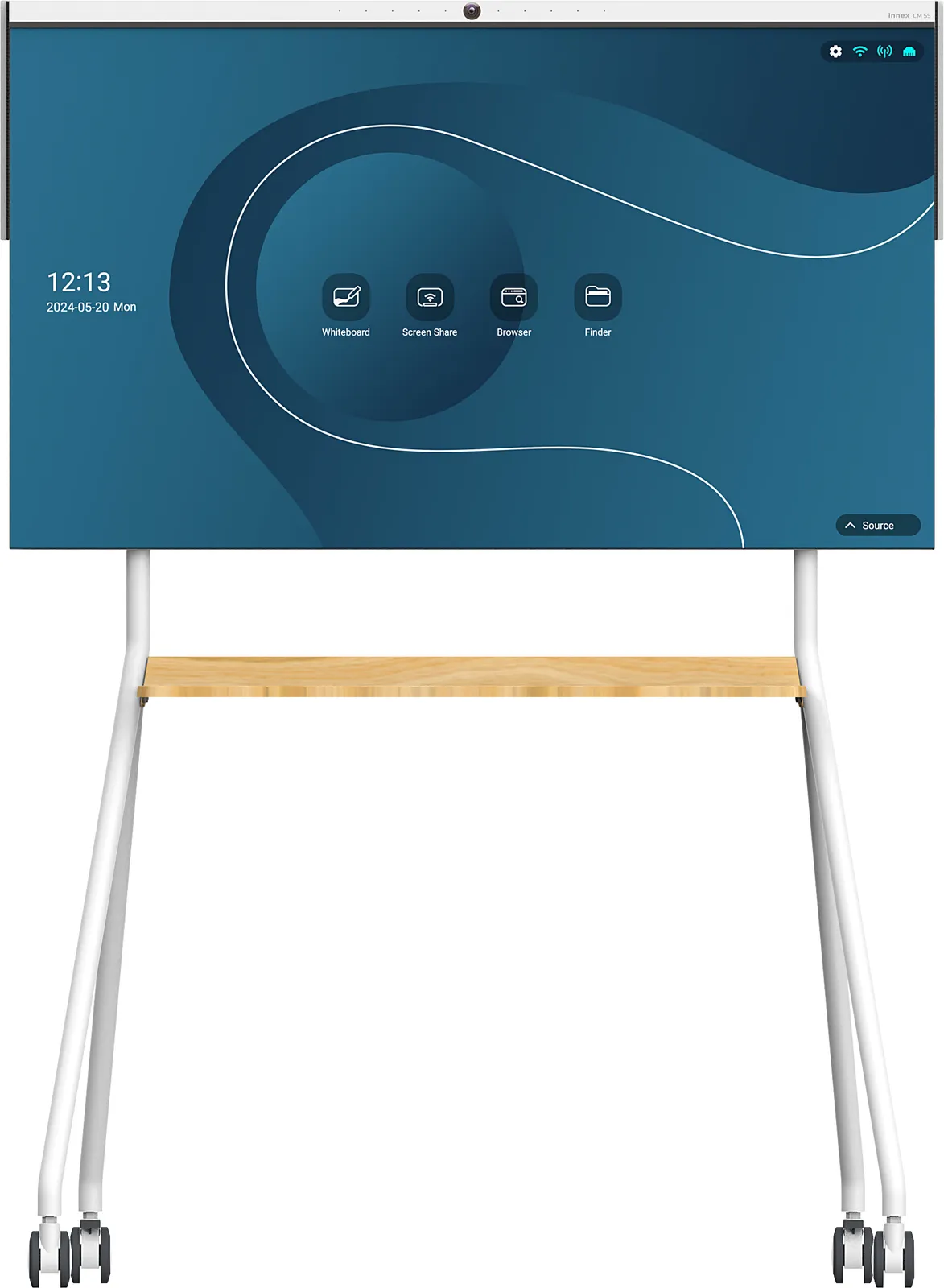
Innex CM interactive whiteboard
Innex CM, 139.7 cm (55"), 350 cd/m², 1.07 billion colours, 3840 x 2160 pixels, 4K Ultra HD, IPS
Built-in microphone: YesMulti-touch: YesNumber of simultaneous touchpoints: 10Processor frequency: 1.9 GHzNative aspect ratio: 16:9HD type: 4K Ultra HD
Specifikacije
- Built-in microphone
- Yes
- Multi-touch
- Yes
- Number of simultaneous touchpoints
- 10
- Processor frequency
- 1.9 GHz
- Native aspect ratio
- 16:9
Opis
Versatile and dynamic. Suitable for Any Space.
Unleash Mobility and Collaboration
Effortlessly draw, annotate, and interact with any content during your meetings, discussions, and brainstorming sessions. Adopting the best in class P-CAP touch technology to enable higher touch accuracy, clearer visuals, and lightweight display design. Bringing your ideas to life and fostering dynamic collaboration.
Wireless Conferencing
Full BYOM (Bring Your Own Meeting) support with responsive multi-screen casting and camera streaming.
Compatibility
Work with Windows, Mac, and Chrome operating system.
AI Camera
Integrated AI camera with multiple video modes available.
Smooth Touch & Write
Interact with your content intuitively, and boost meeting efficiency.
Mobile Stand
Empower space utilization with flexibility and mobility.
Lightweight
Lightweight, thin, and slim bezel design. Less than 15kg/ 33lb to achieve true flexibility.
All-in-One Huddle Space Solution
The Innex Meeting Hub CM series includes everything you need for a productive meeting: interactivity, mobility, outstanding audio and visual, and wireless casting for BYOM.
Ignite Ideas
Effortlessly draw, annotate, and interact with any content during your meetings, discussions, and brainstorming sessions. Adopting the best in class P-CAP touch technology to enable higher touch accuracy, clearer visuals, and lightweight display design. Bringing your ideas to life and fostering dynamic collaboration.
Intuitive Whiteboard
The CM Series whiteboard software enhances collaboration through an intuitive, interactive workspace. Users can annotate and capture screenshots directly from their laptops during screen sharing, integrating them seamlessly into the whiteboard for a more dynamic idea-sharing experience.
Write, Sketch, Annotate
The MPP 2.0 stylus pen elevates productivity with enhanced precision and responsiveness for a smooth, natural writing experience. Its 4096 pressure sensitivity captures every detail, making it ideal for sketching, note-taking, and annotating. The convenient tail eraser allows users to correct mistakes effortlessly with a simple flip.
BYOM Wireless Conferencing
Experience seamless wireless connectivity with the all-in-one CM series. With full BYOM support, use your own laptop and access everything you need in video conferencing, including the built-in camera, mic-array, speakers, screen casting and touch back.
Easily connect and engage with your remote team members or clients through high-quality video without hassle.
Microsoft Pen Protocol Support
Screen sharing with the Connect Pro Button supports the MPP protocol and touchback control, ensuring compatibility with Microsoft Office Suite, Whiteboard, OneNote, Edge, and more.
AI Camera Streaming
The integrated wide-angle camera features AI-powered display modes, including auto-framing, gallery, and speaker tracking.
When screen casting via Connect Pro Button, you can wirelessly access the CM series camera and 8-microphone array from the laptop, without requiring an extra cable connecting between your laptop and conference camera.
Gallery
Gallery mode detects up to 5 people and creates an individual close-up shot for each person, providing an immersive meeting experience.
Auto-framing
Auto-Framing automatically detects where people are seated within its wide-angle view, centers them in the frame, and trims excess space on both sides.
Speaker Tracking
Speaker Tracking mode detects and tracks the active speaker with advanced audio recognition, making it perfect for presentations.
Handy Remote Control
Designed with your utmost convenience in mind, the remote control uniquely combines command over the built-in camera and the display. No need to download additional software or apps – you can easily manage everything with just one remote. Adjust camera modes, change viewing angles, and tailor other settings to your preferences effortlessly.
Mobility Redefined
Effortlessly move the display around rooms, transforming any corner into a creative and collaborative meeting space. Enhance productivity, foster innovation, and unlock the full potential of your meetings with unmatched flexibility and convenience.
Unleash Mobility and Collaboration
Effortlessly draw, annotate, and interact with any content during your meetings, discussions, and brainstorming sessions. Adopting the best in class P-CAP touch technology to enable higher touch accuracy, clearer visuals, and lightweight display design. Bringing your ideas to life and fostering dynamic collaboration.
Wireless Conferencing
Full BYOM (Bring Your Own Meeting) support with responsive multi-screen casting and camera streaming.
Compatibility
Work with Windows, Mac, and Chrome operating system.
AI Camera
Integrated AI camera with multiple video modes available.
Smooth Touch & Write
Interact with your content intuitively, and boost meeting efficiency.
Mobile Stand
Empower space utilization with flexibility and mobility.
Lightweight
Lightweight, thin, and slim bezel design. Less than 15kg/ 33lb to achieve true flexibility.
All-in-One Huddle Space Solution
The Innex Meeting Hub CM series includes everything you need for a productive meeting: interactivity, mobility, outstanding audio and visual, and wireless casting for BYOM.
Ignite Ideas
Effortlessly draw, annotate, and interact with any content during your meetings, discussions, and brainstorming sessions. Adopting the best in class P-CAP touch technology to enable higher touch accuracy, clearer visuals, and lightweight display design. Bringing your ideas to life and fostering dynamic collaboration.
Intuitive Whiteboard
The CM Series whiteboard software enhances collaboration through an intuitive, interactive workspace. Users can annotate and capture screenshots directly from their laptops during screen sharing, integrating them seamlessly into the whiteboard for a more dynamic idea-sharing experience.
Write, Sketch, Annotate
The MPP 2.0 stylus pen elevates productivity with enhanced precision and responsiveness for a smooth, natural writing experience. Its 4096 pressure sensitivity captures every detail, making it ideal for sketching, note-taking, and annotating. The convenient tail eraser allows users to correct mistakes effortlessly with a simple flip.
BYOM Wireless Conferencing
Experience seamless wireless connectivity with the all-in-one CM series. With full BYOM support, use your own laptop and access everything you need in video conferencing, including the built-in camera, mic-array, speakers, screen casting and touch back.
Easily connect and engage with your remote team members or clients through high-quality video without hassle.
Microsoft Pen Protocol Support
Screen sharing with the Connect Pro Button supports the MPP protocol and touchback control, ensuring compatibility with Microsoft Office Suite, Whiteboard, OneNote, Edge, and more.
AI Camera Streaming
The integrated wide-angle camera features AI-powered display modes, including auto-framing, gallery, and speaker tracking.
When screen casting via Connect Pro Button, you can wirelessly access the CM series camera and 8-microphone array from the laptop, without requiring an extra cable connecting between your laptop and conference camera.
Gallery
Gallery mode detects up to 5 people and creates an individual close-up shot for each person, providing an immersive meeting experience.
Auto-framing
Auto-Framing automatically detects where people are seated within its wide-angle view, centers them in the frame, and trims excess space on both sides.
Speaker Tracking
Speaker Tracking mode detects and tracks the active speaker with advanced audio recognition, making it perfect for presentations.
Handy Remote Control
Designed with your utmost convenience in mind, the remote control uniquely combines command over the built-in camera and the display. No need to download additional software or apps – you can easily manage everything with just one remote. Adjust camera modes, change viewing angles, and tailor other settings to your preferences effortlessly.
Mobility Redefined
Effortlessly move the display around rooms, transforming any corner into a creative and collaborative meeting space. Enhance productivity, foster innovation, and unlock the full potential of your meetings with unmatched flexibility and convenience.
Kretanje cena
Aktivni oglasi
Trenutno nema oglasa
Postavi oglas i budi prvi prodavac za ovaj model.